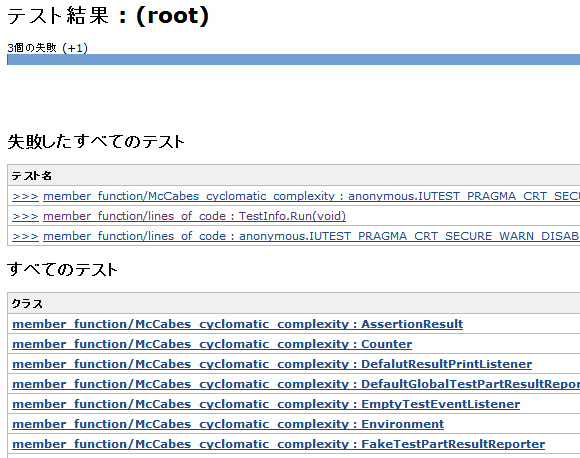
CppNcss というコードメトリクスツールを知ったので試してみました。
CppNcss のダウンロードは
こちらからしました。
セットアップ
ダウンロードしたファイルを解凍すると、バイナリなどが入っているフォルダが展開されるので適当な場所に保存します。
このとき、パスに "空白" が含まれていると動作しないので気をつけてください。
cppncss\bin にパスを通します。
コマンドプロンプトを開いて、cppncss -h[ENTER] と打ちます。
>cppncss -h

Usage: cppncss [options] [file [file2 [directory [directory2] ...]]]
Version: 1.0.3

Options:
  -h                      print this message
  -d                      print debugging information
  -v                      be extra verbose
  -k                      keep going on parsing errors
  -r                      process directories recursively
  -x                      output result as xml
  -m=<measurements>       output the <measurements> sorted in given order, defau
lt is equivalent to -m=NCSS,CCN,function
  -n=<number>             output only the top <number> results
  -f=<file>               output result to <file>
  -D<symbol>[=[<value>]]  replace define <symbol> with <value>
  -M<symbol>[=[<value>]]  replace macro <symbol> with <value>
  -p=<path>               remove <path> prefix when displaying file names

See http://cppncss.sourceforge.net for more information.
上記のようにヘルプが表示されれば OK です。
使ってみる
試しに使ってみました。解析対象は
iutest を使用しました。
include フォルダ以下すべてを解析させるので、 -r オプションをつけています。
>cppncss -r include
---- 省略 ----
Average Function NCSS: 4.86
Average Function CCN: 2.14

Nr. NCSS CCN Functions File
  1  106  45        21 include\gtest\iutest_assertion_only.hpp
  2    0   0         0 include\gtest\iutest_gtest_ver.hpp
  3    0   0         0 include\gtest\iutest_spi_switch.hpp
Average File NCSS: 35.33
Average File CCN: 15.00
Average File Functions: 7.00

Project NCSS: 106
Project CCN: 45
Project Functions: 21
全部のファイルが解析されていないようです。
-k オプションをつけてパーサーエラーが発生しても続行するようにします。
>cppncss -k -r include
---- 省略 ----
Average Function NCSS: 3.75
Average Function CCN: 1.61

Nr. NCSS CCN Functions File
  1  228  81        38 include\internal\iutest_list.hpp
  2  120  42        30 include\iutest_core.hpp
  3  112  56        10 include\util\iutest_util_tests.hpp
  4  106  45        21 include\gtest\iutest_assertion_only.hpp
  5   98  39        30 include\iutest_result.hpp
  6   83  24        11 include\internal\iutest_console.hpp
  7   76  26        22 include\internal\iutest_message.hpp
  8   70  21        14 include\internal\iutest_params_util.hpp
  9   67  23        21 include\iutest_body.hpp
 10   62  16        15 include\internal\iutest_filepath.hpp
 11   46   3         3 include\internal\iutest_option_message.hpp
 12   44  22        18 include\util\iutest_util_quiet_result_printer.hpp
 13   36  12        11 include\internal\iutest_random.hpp
 14   35  10         9 include\internal\iutest_result_reporter.hpp
 15   31  10        10 include\internal\iutest_factory.hpp
 16   30   9         5 include\internal\iutest_exception.hpp
 17   25   1         1 include\internal\iutest_stdlib.hpp
 18   24   4         4 include\internal\iutest_mediator.hpp
 19   18   4         3 include\internal\iutest_pool.hpp
 20   13   2         2 include\iutest_static_assertion.hpp
 21   11   4         2 include\gtest\switch\iutest_switch_inform.hpp
 22   10   4         4 include\gtest\switch\iutest_switch_filepath.hpp
 23    5   0         0 include\internal\iutest_regex.hpp
 24    2   0         0 include\util\iutest_util_output.hpp
 25    1   0         0 include\internal\iutest_tuple.hpp
 26    1   0         0 include\iutest_util.hpp
 27    0   0         0 include\gtest\iutest_gtest_ver.hpp
 28    0   0         0 include\gtest\iutest_spi_switch.hpp
 29    0   0         0 include\gtest\switch\iutest_switch_assert.hpp
 30    0   0         0 include\gtest\switch\iutest_switch_core.hpp
 31    0   0         0 include\gtest\switch\iutest_switch_expect.hpp
 32    0   0         0 include\gtest\switch\iutest_switch_no_failure.hpp
 33    0   0         0 include\gtest\switch\iutest_switch_package.hpp
 34    0   0         0 include\gtest\switch\iutest_switch_peep.hpp
 35    0   0         0 include\gtest\switch\iutest_switch_pmz.hpp
 36    0   0         0 include\gtest\switch\iutest_switch_pred.hpp
 37    0   0         0 include\gtest\switch\iutest_switch_skip.hpp
 38    0   0         0 include\gtest\switch\iutest_switch_throw_value.hpp
 39    0   0         0 include\internal\iutest_compiler.hpp
 40    0   0         0 include\internal\iutest_internal.hpp
 41    0   0         0 include\internal\iutest_pp.hpp
 42    0   0         0 include\internal\iutest_pragma.hpp
 43    0   0         0 include\iutest_config.hpp
 44    0   0         0 include\iutest_ignore.hpp
 45    0   0         0 include\iutest_ver.hpp
Average File NCSS: 30.09
Average File CCN: 10.18
Average File Functions: 6.31

Project NCSS: 1354
Project CCN: 458
Project Functions: 284
できました。
NCSS と CCN
NCSS は "Non Commenting Source Statements"
CCN は "Cyclomatic Complexity Number"
の略です。計測できるのはこの2つだけのようです。
Jenkins との連携
CPPNCSS Plugin があるのでインストールします。
適当に CppNcss を行うプロジェクトを作成したら、
[ビルド後の処理の処理の追加] から [Publish Cpp NCSS Report] を選択します。

xml ファイルのパスと、関数単位でのステートメント数と複雑度の閾値を設定します。
こんな感じで集計、グラフ化できました。

CCCC との比較
C/C++ のコードメトリクスツールには他にも
SourceMonitor や
CCCC などがあります。
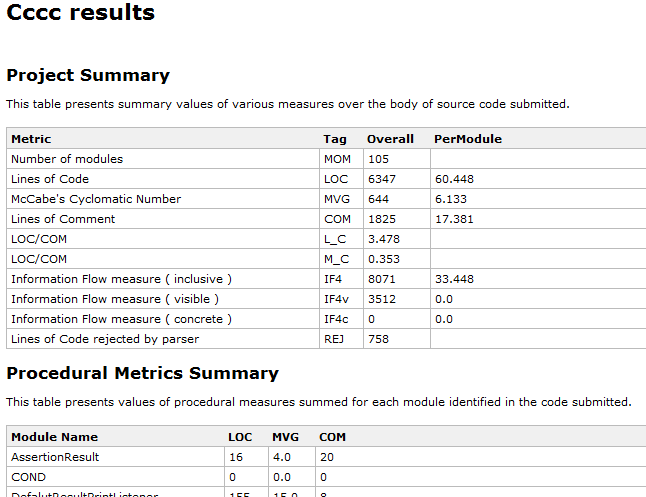
個人的に CCCC を使っているので比較をしてみたいと思います。
(※ CCCC についてはこちらも参考にしてください)
計測できる項目
| CppNcss | CCCC | 概要 |
|---|
| Number of Module | x | o | モジュール(クラス)数 |
| Line of Code | x | o | コード行数 |
| Non Commenting Source Statements | o | x | ステートメント数 |
| Cyclomatic Number | o | o | 複雑度 |
| Line of Comment | x | o | コメント行数 |
| LOC/COM | x | o | 1コメントあたりのコード行数 |
| MVG/COM | x | o | 1コメントあたりの複雑度 |
| Information Flow measure (inclusive) | x | o | モジュール間結合 |
| Information Flow measure (visible) | x | o | モジュール間結合 |
| Information Flow measure (concrete) | x | o | モジュール間結合 |
| Weight Methods per Class (unity) | x | o | 関数の重み(重み=1) |
| Weight Methods per Class (visible) | x | o | 関数の重み(重み=外部アクセスの可否) |
| Depth of Inheritance Tree | x | o | 継承の深さ |
| Number of Children | x | o | 子クラスの数 |
| Coupling between objects | x | o | クラスが依存する外部クラスの数 |
| Lines of Code rejected by parser | x | o | 解析に失敗した行数 |
ステートメント数
CppNcss で計測できるのは、ステートメント数(NCSS)です。
一方 CCCC で計測できるのは、コード行数(LOC)です。
以下のコードで比較してみました。
class X
{
    int value;
public:
    int getValue() { return value; }
    void setValue(int v)
    {
        value = v;
    }
};

int f()
{
    int a=0;
    int b=0, c=0;

    // loop
    for( int i=0; i < 10; ++i )
    {
        do
        {
            while(1)
            {
                ++a;
                break;
            }
        } while(0);
    }

    if( a != b )
    {
        if( a != c ) {
            X x;
            x.SetValue(a);
            c = x.
                GetValue();
        } else {
        }
    }
    else
    {
    }

    a = b; b = c; c = a;
    return b;
}

int main(int, char**)
{
    f();
    return 0;
}
CppNcss の結果
Nr. NCSS CCN Function
1 19 6 f() at main.cpp:14
2 3 1 main( int, char** ) at main.cpp:50
3 2 1 X::getValue() at main.cpp:7
4 2 1 X::setValue( int ) at main.cpp:8
Average Function NCSS: 6.50
Average Function CCN: 2.25
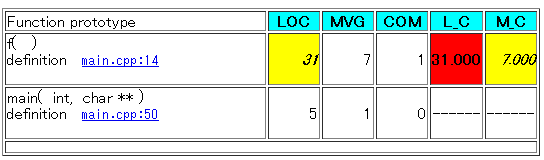
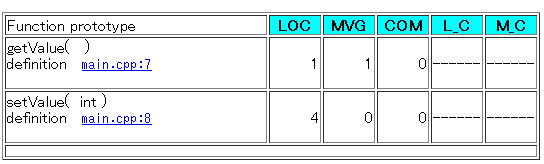
CCCC の結果


全く別物であることがわかりますね。
さて、ステートメント数の計算についてもう少し調べてみたいと思います。
今度はこちらのコードを CppNcss にかけます。
int a=0;

void for_()
{
    for( int i=0; i < 10; ++i )
    {
        ++a;
    }
}

void do_()
{
    do
    {
        ++a;
    } while(1);
}

void while_()
{
    while(1)
    {
        ++a;
    }
}

void if_()
{
    if(1)
    {
        ++a;
    }
    else
    {
    }
}

void elseif_()
{
    if(0)
    {
    }
    else if(1)
    {
        ++a;
    }
    else
    {
    }
}

void switch_()
{
    switch(a)
    {
    case 0:
        ++a;
        break;
    }
}

void switch2_()
{
    switch(a)
    {
    case 0:
        ++a;
        break;
    case 1:
        break;
    }
}

void switchdefault_()
{
    switch(a)
    {
    case 0:
        ++a;
        break;
    default:
        break;
    }
}

void cond_()
{
    a > 0 ? --a : ++a;
}

class A
{
public:
    int get() const { return 1; }
};
class B
{
    A a;
public:
    const A* get() const { return &a; }
};

B b;
void call_()
{
    b.get();
}
void call2_()
{
    b.get()->get();
}
こちらのコードを解析した結果がこちら。
Nr. NCSS CCN Function
1 7 3 switch2_() at main.cpp:62
2 7 2 switchdefault_() at main.cpp:74
3 6 3 elseif_() at main.cpp:38
4 5 2 switch_() at main.cpp:52
5 4 2 if_() at main.cpp:27
6 3 2 for_() at main.cpp:3
7 3 2 do_() at main.cpp:11
8 3 2 while_() at main.cpp:19
9 2 2 cond_() at main.cpp:86
10 2 1 A::get() at main.cpp:94
11 2 1 B::get() at main.cpp:100
12 2 1 call_() at main.cpp:104
13 2 1 call2_() at main.cpp:108
Average Function NCSS: 3.69
Average Function CCN: 1.85
想定した結果になりました。とくに言うことはありませんね。
(switchdefault_ と switch2_ で CCN が違うのはこういうもん?)
複雑度
CppNcss の複雑度の計算方法がわかりませんが(CCCC は McCabe)、
こちらも上記の最初のコードで比較してみました。
これだけではわかりにくいので、Visual Studio 2012 の Win32 プロジェクトのテンプレートコードで比較してみました。
計測できなかったので、スルー。
iutest の結果で比較しようと思いましたが、どちらか片方が計測できていないものばかりで、良いサンプルがなかったので割愛させてもらいます。m(__)m
c++ ファイル以外の計測
CppNcss では、.cpp や .c など標準的な拡張子のファイルしか計測してくれません。
なので、.ipp など独自拡張子を計測することができません。
CCCC の場合は、コマンドライン引数に --lang=c++ とすることで、独自ファイルの計測も可能です。
Jenkins との連携
CCCC の Jenkins との連携はちょっと残念なかんじです。
プロジェクトやモジュール単位の結果をみることができるのですが、関数単位での結果が見れません。
この関数単位での結果が一番みたいところなんですが…

CCCC の結果 xml/html ファイルには関数単位の結果も書き込まれているので、
Jenkins でそれらを見たい場合は
HTML Publisher Plugin を使うとよいでしょう。
また、独自に xml を解析して Jenkins で集計可能な xml にするのも手です。
そのへんについては、
ブログズミ: CCCC + Jenkins + HTML Publisher Plugin
ブログズミ: CCCC + Jenkins
を参考にしてください。
CppNcss の方は関数単位の結果を表示してくれます。
Jenkins プラグインは CppNcss の方がイイ感じです。
総評
CppNcss は CCCC と比べて、解析出来る内容は少ないですが手軽に使えそうです。
また、ステートメント数が計測できるのと、CCCC では計測失敗する箇所でも CppNcss なら計測できる場合もあるので、CppNcss と CCCC を両方使うのもありだと思いました。
あとは、集めた情報をどう活かすかになりますが、それはまた今度の機会にでも…(
できたら…)