ラベル Scrutinizer の投稿を表示しています。 すべての投稿を表示

2018年3月19日月曜日

[CI] 各種 CI サービスのビルドスキップコメントまとめ (2018/3)

CIサービスの自動ビルドをスキップする方法まとめ - Qiita
こちらに Travis CI、Circle CI、Appveyor の場合がまとまっていますが、この記事では私が利用している CI サービスすべてをまとめたいと思います。

[ci skip] vs [skip ci]
CI サービスでスキップするためのコミットコメントの定番が [ci skip] と [skip ci] です。どちらにも対応しているサービスもあれば、片方だけだったり、これに加えて独自のメッセージに対応していたりします。

iutest では全部で10以上のサービスを利用しているので、すべてのサービスで共通して使えるコメントでないと困るので今回のまとめに至りました。
また、特定のサービスだけスキップしたいなどの要求もあるかもしれないので、そういった場合にも役立つまとめになっているかと思います。

前置きはこれくらいにして、まとめを見ていきましょう。
まとめ
サービス[ci skip][skip ci]その他ユーザー定義
Travis CI
Circle CI
AppVeyor[skip appveyor]
wercker
Shippable
Codeship--skip-ci,--ci-skip
Semaphore
Codefresh
Bitrise
Scrutinizer[skip Scrutinizer]
Rocro(INSPECODE)

以前は、[ci skip] 派と [skip ci] 派が分かれていたのですが、
現在は [ci skip]/[skip ci] どちらも使える派が主流のようです。
Rocro はスキップできないみたいですね。


ユーザー定義も可能な AppVeyor
AppVeyor ではユーザーが任意のスキップコメントをつけることもできます。
https://www.appveyor.com/docs/how-to/filtering-commits/#skip-commits

やり方は appveyor.yml に以下を追加するだけです。

skip_commits:
  message: /\[no appveyor\]/

これを設定しておけば、AppVeyor だけスキップするような使い方ができます。

自分ですべて設定する Codefresh
https://docs.codefresh.io/docs/build-1
Codefresh にはデフォルトでスキップコメント機能はついていませんでした。
ただ、上記リンクのようにコンディションに書けば対応が可能でした。

steps:
  BuildingDockerImage:
    title: Building Docker Image
    type: build
    image_name: srzzumix/ciskip
    working_directory: ./
    dockerfile:
      content: |-
        FROM ubuntu:latest
        COPY . /usr/src/myapp
        WORKDIR /usr/src/myapp
    tag: '${{CF_BRANCH_TAG_NORMALIZED}}'
    when:
      condition:
        all:
          noSkipCiInCommitMessage: |
            includes(lower("${{CF_COMMIT_MESSAGE}}"), "[ci skip]") == false && includes(lower("${{CF_COMMIT_MESSAGE}}"), "[skip ci]") == false

注意が必要なのは、スキップ設定はすべてのステップに記述しないといけない点です。
(前のステップがスキップされても、後続のステップはスキップされないです。前のステップに依存しているとビルドが失敗します。)
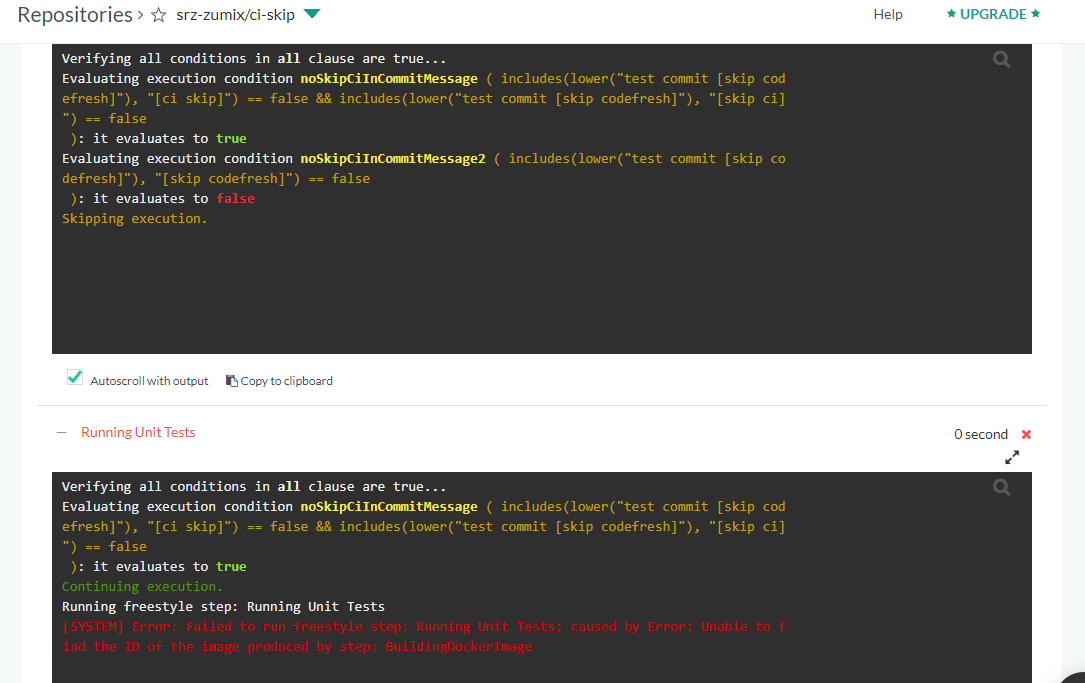
また、スキップしたと言ってもビルド回数はカウントアップされます。。。(フリーアカウントの場合ビルド回数制限があるので気をつけましょう)

Only the head/last commit message is checked!
Bitrise のドキュメントに以下の注意書きがありました。
Only the head/last commit message is checked!
If you push more than one commit,
only the last ("head") commit's message will be checked for the skip ci pattern!
http://devcenter.bitrise.io/tips-and-tricks/skip-a-build/

複数のコミットをまとめて push した場合、コメントは最後のコミットのものしかチェックしないようです。つまり、途中のコミットにスキップコメントを入れてもスキップされないということです。

他のサービスではどうなのか調べてみたところ、(Travis CI を除く)他のサービスも同様の挙動をしてました。

Travis CI は全部にスキップコメントが必要
Travis CI は push したときの head だけでなく、commit 毎にビルドが実行されるようなので、全部のコミットにスキップメッセージを入れないとイケナイようです。
「Auto cancel branch builds」設定ができるようになりましたが、これは新しいビルドがキューイングされたらキャンセルする機能です。
スキップコメントの commit はキューイングされないため自動キャンセルもされません。

なので、Travis CI を使う場合は [ci skip] をスキップしたいコミットにつける必要があります。

Travis CI は、スキップしたいコミットに [ci skip] をつける。
それ以外は、スキップしたいコミットを含む push を行う場合は head のコミットに [ci skip] をつける。
ということになるので、Travis CI の方が直感的かもしれませんね。

最後に
今回調べたことは、こちらのリポジトリで検証・記録として見ることができます。
https://github.com/srz-zumix/ci-skip

他に試して欲しい CI サービスなどありましたら、連絡もしくは PR ください。
では。

2017年8月8日火曜日

[CI] Scrutinizer 始めました


今回紹介する CI サービスは Scrutinizer です。
Pricing をみるとフリープランはないように見えますが、OSS であればフリーで使えるようです

今回、使い始めてから紹介できるようになるまでにかなーりの年月を費やしてしまいましたので、Sign up まわりは省略させていただきます。
(C++非サポート&Python のテスト周りで手間取った)

Scruntinizer の魅力
Scruntinizer の魅力は登録するだけですぐに静的解析の結果が得られるところです。
Scruntinizer は静的解析などの検証に特化した CI サービスで、めんどうな設定や YAML を書かずにすぐに始められます。テストもリポジトリを探索して自動で実行してくれます。

あと、レポートもグラフィカルでいい感じです。


使用例
いつもであれば、iutest の使用例で紹介するのですが、C++ は非サポートなので、
今回は「ブログズミ: ソースコード中の単語からの略語/スペルミス検出に挑戦」で作成した
taggertool リポジトリで紹介します。

リポジトリ登録
まずは、リポジトリの登録から始めます。
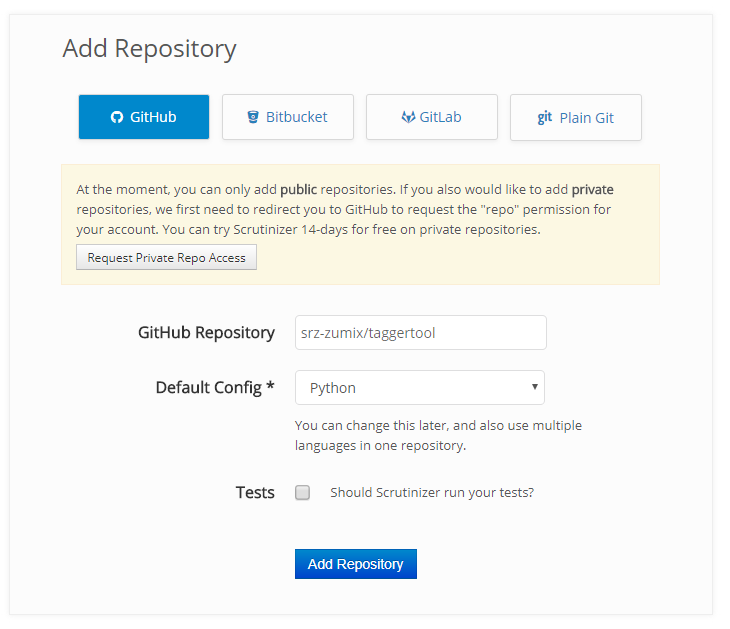
「Add Repository」ボタンを押すと、以下のような画面になるので、CI したいリポジトリを入力、言語を選択して、登録します。


リポジトリは、Github/Bitbucket/GitLab/PlainGit から選択できます。
Plain Git が可能なので、独自リポジトリが使えるのは良いところだと思います。

登録は以上です。
完了すると最初のテストが実行されます。

taggertool の結果
taggertool の結果はこんな感じです。

サマリー


Issues に、各静的解析で出た結果が出ます。


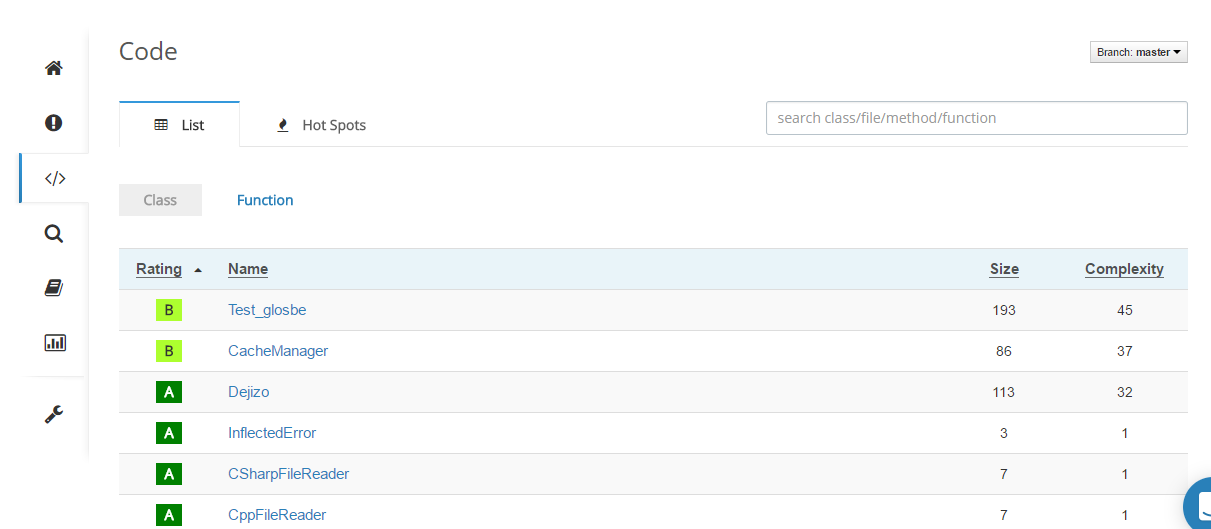
Code にはクラスおよび関数のサイズと複雑度がリストアップされます。


Inspections はキックされたジョブが並びます。


Reports には最後に実行されたジョブの結果が表示されます。


最後に、Statistics には Quality Rating や issue などの推移がグラフで確認できます。
Quality Rating は上の図で 9 となっているやつで、コードの複雑度、結合度など複数の要素から1つのスコアにしたもので、10点満点で評価されます。


チェック項目を増やす
さて、Scrutinizer には様々なツールで様々な解析ができる準備がされていますが、デフォルトでは多くのチェックは無効になっています。
チェックを有効にするには、Settings の Configuration に Checks ボタンがあるので、そこを開きます。


開くと Not Enabled なチェック項目がリストアップされているので、
必要なものにチェックを入れてください。


チェックの有効化は Congiguration の Repogitry Config や yml に直接書くこともできます。
チェックしたい項目が多い場合は、(UI でチェックするのが面倒なので)こちらの方がよいでしょう。

また、グローバルな設定も作成できるので、
複数プロジェクトで同じチェックをさせたい場合は、そちらを使うと良さそうです。
checks:
    python:
        code_rating: true
        duplicate_code: true
        variables_used_before_assignment: true
        variables_unused_wildcard_import: true
        variables_unused_variable: true
        variables_unused_import: true
        variables_unused_argument: true
        variables_unpacking_non_sequence: true
        variables_undefined_variable: true
        variables_undefined_loop_variable: true
        variables_undefined_all_variable: true
        variables_unbalanced_tuple_unpacking: true
        variables_redefined_outer_name: true
        variables_redefined_builtin: true
        variables_redefine_in_handler: true
        variables_no_name_in_module: true
        variables_invalid_all_object: true
        variables_global_variable_undefined: true
        variables_global_variable_not_assigned: true
        variables_global_statement: true
        variables_global_at_module_level: true
        typecheck_unexpected_keyword_arg: true
        typecheck_too_many_function_args: true
        typecheck_redundant_keyword_arg: true
        typecheck_not_callable: true
        typecheck_no_value_for_parameter: true
        typecheck_no_member: true
        typecheck_missing_kwoa: true
        typecheck_maybe_no_member: true
        typecheck_duplicate_keyword_arg: true
        typecheck_assignment_from_none: true
        typecheck_assignment_from_no_return: true
        string_truncated_format_string: true
        string_unused_format_string_key: true
        string_too_many_format_args: true
        string_too_few_format_args: true
        string_mixed_format_string: true
        string_missing_format_string_key: true
        string_format_needs_mapping: true
        string_constant_anomalous_unicode_escape_in_string: true
        string_bad_str_strip_call: true
        string_constant_anomalous_backslash_in_string: true
        string_bad_format_string_key: true
        string_bad_format_character: true
        open_mode_bad_open_mode: true
        miscellaneous_fixme: true
        newstyle_bad_super_call: true
        logging_unsupported_format: true
        logging_too_many_args: true
        logging_too_few_args: true
        logging_not_lazy: true
        logging_format_truncated: true
        imports_wildcard_import: true
        imports_relative_import: true
        imports_reimported: true
        imports_import_self: true
        imports_import_error: true
        imports_deprecated_module: true
        imports_cyclic_import: true
        format_unnecessary_semicolon: true
        format_trailing_whitespace: true
        format_superfluous_parens: true
        format_old_ne_operator: true
        format_multiple_statements: true
        format_mixed_indentation: true
        format_missing_final_newline: true
        format_lowercase_l_suffix: true
        format_line_too_long:
            max_length: '100'
        format_bad_whitespace: true
        format_bad_indentation:
            indentation: '4 spaces'
        format_backtick: true
        exceptions_raising_non_exception: true
        exceptions_raising_string: true
        exceptions_raising_bad_type: true
        exceptions_pointless_except: true
        exceptions_notimplemented_raised: true
        exceptions_catching_non_exception: true
        exceptions_broad_except: true
        exceptions_binary_op_exception: true
        exceptions_bare_except: true
        exceptions_bad_except_order: true
        design_interface_not_implemented: true
        design_abstract_class_not_used: true
        design_abstract_class_little_used: true
        classes_valid_slots: true
        classes_super_init_not_called: true
        classes_signature_differs: true
        classes_protected_access: true
        classes_non_parent_init_called: true
        classes_non_iterator_returned: true
        classes_no_self_use: true
        classes_no_self_argument: true
        classes_no_method_argument: true
        classes_no_init: true
        classes_missing_interface_method: true
        classes_method_hidden: true
        classes_interface_is_not_class: true
        classes_bad_staticmethod_argument: true
        classes_bad_mcs_method_argument: true
        classes_bad_mcs_classmethod_argument: true
        classes_bad_context_manager: true
        classes_bad_classmethod_argument: true
        classes_attribute_defined_outside_init: true
        classes_arguments_differ: true
        classes_access_member_before_definition: true
        classes_abstract_method: true
        basic_yield_outside_function: true
        basic_useless_else_on_loop: true
        basic_unreachable: true
        basic_unnecessary_pass: true
        basic_unnecessary_lambda: true
        basic_star_args: true
        basic_return_outside_function: true
        basic_return_in_init: true
        basic_return_arg_in_generator: true
        basic_pointless_string_statement: true
        basic_pointless_statement: true
        basic_old_raise_syntax: true
        basic_not_in_loop: true
        basic_nonexistent_operator: true
        basic_missing_reversed_argument: true
        basic_missing_module_attribute: true
        basic_missing_docstring: true
        basic_lost_exception: true
        basic_init_is_generator: true
        basic_function_redefined: true
        basic_expression_not_assigned: true
        basic_exec_used: true
        basic_eval_used: true
        basic_empty_docstring: true
        basic_duplicate_key: true
        basic_duplicate_argument_name: true
        basic_dangerous_default_value: true
        basic_bad_reversed_sequence: true
        basic_assert_on_tuple: true
        basic_abstract_class_instantiated: true

最後に
Scruntinizer は、最初から静的解析ツールが用意されており、それを目的にするのであれば、
通常の CI サービスよりも、とても簡単に恩恵が得られるのでオススメです。
(C++ がサポートされるともっとステキですが…あ、あと Scruntinizer のスペルが全然覚えられない…

今回は Python で利用しましたが、他の言語で何か作るときは、また利用したいなと思います。

以上。